Best ICM Calculators Compared
The best ICM calculators for deals, push/fold, and study. Here's a side-by-side comparison of free and paid tools and which to pick for each job.
On this page · 6 sections
The best ICM calculator depends on the job. For splitting a final-table prize pool, a free web-based chop calculator is fastest and perfectly accurate. For studying push/fold spots and calling ranges, you want a solver-based ICM trainer that outputs Nash ranges and risk premium. For reviewing whole tournaments, a full study suite. This guide matches each tool type to its purpose so you don’t overpay for features you’ll never open.
The three jobs an ICM tool does
Before comparing products, separate what you actually need. Every ICM tool serves one of three jobs, and most players only need one:
- Deals — compute each player’s fair dollar share for a final-table chop. Input stacks and payouts, read off the split.
- Push/fold study — generate Nash-equilibrium shove and call ranges adjusted for ICM, so you know which hands are jams and which are folds near a pay jump.
- Full review — import a hand history and see the ICM equity of every decision, exposing leaks across a whole tournament.
Matching the tool to the job is the entire skill. A deal calculator can’t teach you ranges; a solver is overkill for a chop.
Comparison: the named tools at a glance
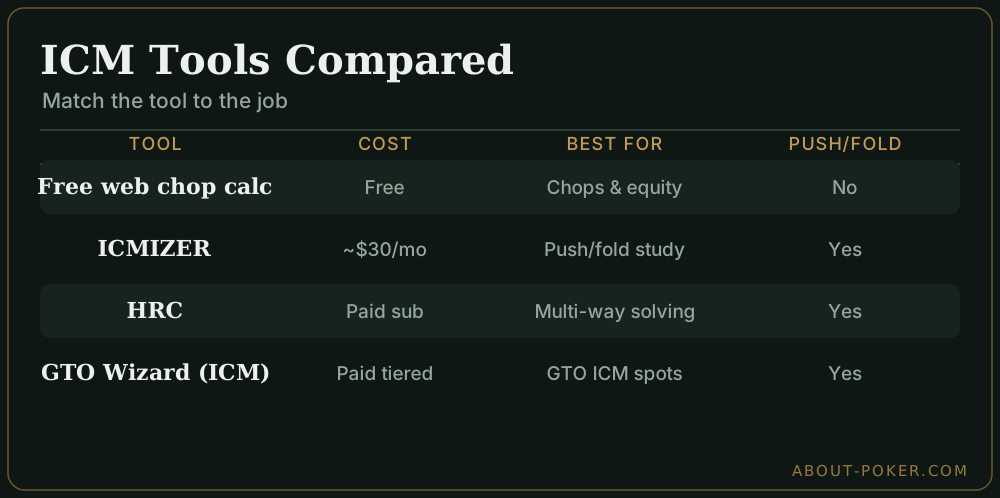
Below are the ICM tools most players actually reach for, matched to the three jobs above. Prices move around and vary by plan and billing period, so treat the figures as rough tiers, not quotes — check each tool’s own site before you buy.
| Tool | Cost tier | Best for | Push/fold ranges | Deal splits |
|---|---|---|---|---|
| Free web ICM chop calculators (e.g. Primedope, ICMPoker’s free deal tool) | Free | Final-table chops & dollar equity | No | Yes |
| ICMIZER | Paid, roughly ~$30/mo (cheaper on annual; limited free trial) | Push/fold study & Nash ranges | Yes | Some plans |
| HoldemResources Calculator (HRC) | Paid, monthly sub or higher one-time-style tiers | Deep multi-way ICM/Nash solving | Yes | Yes |
| GTO Wizard (ICM mode) | Paid, tiered subscription (a limited free tier exists) | ICM-aware GTO ranges & spot study | Yes | Indirectly |
A few notes on the paid options:
- ICMIZER is the long-standing dedicated ICM push/fold trainer. Its core job is generating Nash shove and call ranges for late-game and final-table spots, and it’s the most beginner-friendly of the paid tools.
- HoldemResources Calculator (HRC) is the power user’s solver: fast, accurate multi-way ICM and Future Game Simulation, strong for building precise ranges across many players. Steeper learning curve than ICMIZER.
- GTO Wizard added an ICM/tournament mode to its browser-based GTO solver, so you can study ICM-adjusted spots inside the same tool you use for cash and chip-EV play — convenient if you already study there.
The pattern holds: the free web tools fully cover deals and equity, while Nash ranges and range-vs-range study sit behind a subscription. Most recreational players never need to cross that line.
Which to pick
If you only chop deals: a free web ICM or chop calculator (Primedope’s ICM deal calculator or ICMPoker’s free deal tool) is all you need. Enter stacks and payouts, get an instant fair split. Nothing paid does this job meaningfully better — see ICM deal making for how to read the output and when to take the deal.
If you want to study push/fold: step up to a paid ICM trainer. ICMIZER is the friendliest starting point and is built around exactly this job; HoldemResources Calculator (HRC) is the more powerful choice once you want fast, precise multi-way solving. Both generate Nash shove and call ranges by stack depth and payout structure — the closest thing to a solved answer for late-game spots. Worth it if you play meaningful volume.
If you already study GTO: GTO Wizard’s ICM mode lets you work ICM-adjusted spots inside the same browser tool you use for chip-EV play, so you don’t juggle two subscriptions. Best for players who already live in a GTO trainer and want tournament-pressure ranges alongside it.
If you review your play: a full study suite that imports hand histories and flags ICM leaks across a session is the ceiling. It’s the most expensive tier and only pays for itself if you’re grinding seriously and putting in study time between sessions.
What separates a good tool from a bad one
Not every calculator is built equally, and the differences show up exactly when the stakes are highest. When you shortlist a tool, check for these:
- Correct payout handling — it must let you enter the full prize ladder, not just the number of paid spots. A tool that assumes an even split will mangle any real structure.
- Speed at the table — for deals, you often have 60 seconds. A clean interface that takes stacks and payouts and returns a split instantly beats a powerful tool buried in menus.
- Range input, not just equity — for study, you want to enter shoving and calling ranges and see ICM-adjusted results, not just plug in a single win percentage.
- Transparent assumptions — the best tools state that ICM ignores skill and position and assumes each chip is equally likely to win. If a tool hides its model, distrust its edge cases.
A free chop calculator only needs the first two. A study tool needs all four. Judge each against the job you’re buying it for, not against its longest feature list.
A quick sanity check on any tool
Whatever calculator you use, verify it with a known result. Feed it four equal stacks and payouts of $50 / $30 / $20 / $0. A correct ICM tool must return $25 each — with equal stacks everyone has an identical shot at every finish, so equities are equal and sum to the $100 pool. If a calculator returns anything else for that symmetric case, it’s broken or you’ve mis-entered the payouts.
The takeaway
Pick the ICM calculator that fits the job: free web tools nail deals and equity, paid trainers add push/fold and study, and full suites handle whole-tournament review. Sanity-check any tool with the four-equal-stacks test before you trust its numbers. Learn to drive one properly in how to use an ICM calculator, and browse the wider tools and software hub for the rest of your poker study stack.
Frequently asked
What is the best ICM calculator?
There's no single winner — it depends on the job. For quick final-table deals, a free web ICM chop calculator is fastest. For push/fold and range study, a paid solver-based tool like an ICM trainer gives Nash ranges and equity output. For hand-history review, a full ICM study suite is best.
Is there a free ICM calculator?
Yes. Several free web-based ICM calculators handle the two most common jobs: computing a fair chop for a final-table deal and finding each player's dollar equity from their chip stacks. They're accurate for deals but usually lack push/fold ranges and range-vs-range analysis.
What is the difference between an ICM deal calculator and an ICM trainer?
A deal calculator takes chip stacks and payouts and returns each player's fair dollar share — ideal for negotiating a chop. An ICM trainer or solver adds strategy: it computes push/fold ranges, risk premium, and range-vs-range equity, which you use to study rather than to split a prize.
Do I need a paid ICM calculator?
Not for deals — free tools do that fine. You only need a paid tool if you want strategy output: Nash push/fold charts, ICM-adjusted ranges, and hand-history review. Serious tournament players buy those; recreational players are well served by the free chop calculators.